v1.0.0 · free forever · no account

Murder Mystery 2 Macro
record the grind once.

Stop running the same knife lobby sequence over and over. Record your MM2 routine—knife farming, rounds, loot pickups—and replay it with a single keypress while you step away. MM2 Macro captures pure keyboard and mouse input without altering game files, so your routine runs exactly the same every time.

No game file changesNo telemetry or trackingFree and always will bev1.0.0
Record MM2 routinesReplay on hotkeyNo game changesKeyboard & mouse onlyWorks in fullscreen
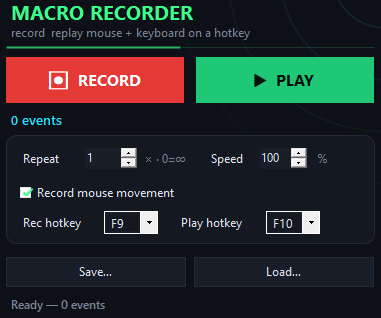
MM2 Macro app window on Windows
Get started in seconds

Set up your MM2 grinding macro in four steps.

Record your farming loop one time and automate it from then on.

  1. Start MM2 Macro and press F9The app begins capturing every keystroke and mouse action you make in the game window.
  2. Run your grind sequenceComplete one full cycle—equip knife, play the round, return to lobby, prepare for the next match—then press F9 again to stop.
  3. Press F10 to test the replayWatch your macro run through the entire routine at the same speed. Adjust the speed slider if timing feels off, then test again.
  4. Save and loop indefinitelyStore your routine as a file so you can load it anytime. Set the loop count to infinite and let the macro keep you active.
vs. game injection

MM2 Macro vs. other grinding tools.

Most grind helpers inject code into the game or hide your input—MM2 Macro does neither.

 MM2 MacroGame injection tools
Input methodPure keyboard & mouseGame code injection
File storageSave and reload routinesConfig in cloud account
Game modificationNone—standard input onlyInjects into game files
Speed controlSlider from 10% to 1000%Fixed preset speeds
CostFree foreverSubscription or one-time fee
Offline useFull offline, no internetRequires account login
Windows 10 & 11

MM2 Macro at a glance.

Version1.0.0
PlatformWindows 10 and 11, 64-bit
InstallQuick download, no account
LicenseMIT, source on GitHub
PriceFree, no account
LanguageEnglish
How it works
Inside the appMM2 Macro window

Your MM2 grind on repeat without the repetition.

Set up your grinding loop once and let it run. The macro captures every knife equip, every lobby click, every pause between rounds—then replays that exact sequence on demand, keeping you active in matches while you handle other things.

Knife farming stays consistentEvery loop hits the same actions at the same pace, no lag between button presses or missed clicks.
Lobby routines run hands-freeAutomate waiting, round prep, or knife selection so your character stays active and climbing ranks.
Grind session never stallsSet the replay to loop indefinitely; stop it whenever you want to jump back in.
Why MM2 players choose it

Why MM2 Macro beats pressing the same keys by hand.

Grinding Murder Mystery 2 demands the same inputs match after match—a perfect job for macro replay.

Real questions answered

Questions about MM2 Macro.

Will this get me banned from MM2?

MM2 Macro replays regular keyboard and mouse input without modifying the game. Whether your account stays safe depends on the game's terms—check Murder Mystery 2's rules about macros. The tool itself does not inject code or hide your actions.

Can I record a complex knife combo or aim pattern?

MM2 Macro captures pure input: clicks, keys, and mouse movement. For farming loops and lobby routines it works perfectly. Complex action sequences depend on how precisely you can execute them during recording.

Do I need to restart the app to load a saved routine?

No. Use File → Open to load any saved routine anytime. Press F10 immediately to replay it.

Can I run multiple macros at once?

MM2 Macro replays one routine per session. Load a different macro, press F10, and it queues up. To run two sequences back-to-back, record them as one continuous routine.

What if my MM2 lobby changes or the knife equips differently?

Your recorded routine will still play the same inputs. If the game layout shifts, the clicks may land in different spots. Keyboard-based routines (equip hotkeys, emotes) are more portable across changes than pure cursor movement.

Does it work on Windows 11?

Yes. MM2 Macro runs on Windows 10 and Windows 11, both 64-bit.

Can I adjust speed mid-replay?

The speed slider takes effect on the next replay cycle. Adjust the percentage and press F10 again to run at the new pace.
Stop grinding the same sequence by hand.

Record your MM2 routine once and let the macro handle it—stay active, climb ranks, and save yourself from button fatigue.

Download for Windows
Latest release · v1.0.0

MM2 Macro guides